Introduction
A developer reading a bug report has one question: can I make this happen on my machine? If the answer is no, the report comes back with questions, and the bug waits. A good bug report answers that question, and the next three, before anyone has to ask.
Advice on bug reports is easy to agree with and hard to apply, so this guide uses a real bug. Sauce Demo is a public practice shop, and its problem_user account is deliberately broken. We found a checkout bug there, wrote it up in one line, then wrote it up properly, and scored both versions with our free bug report grader.
| Version | Words | Grader score |
|---|---|---|
| One-line report | 23 | 20 / 100, "Will bounce back" |
| Complete report | 171 | 100 / 100, "Ready to file" |
The bug
An automated checkout test failed for problem_user: after filling in the form, the page showed "Error: Last Name is required", even though the test had filled in a last name.
Before reporting it, we reproduced it by hand and tried two ways of entering text:
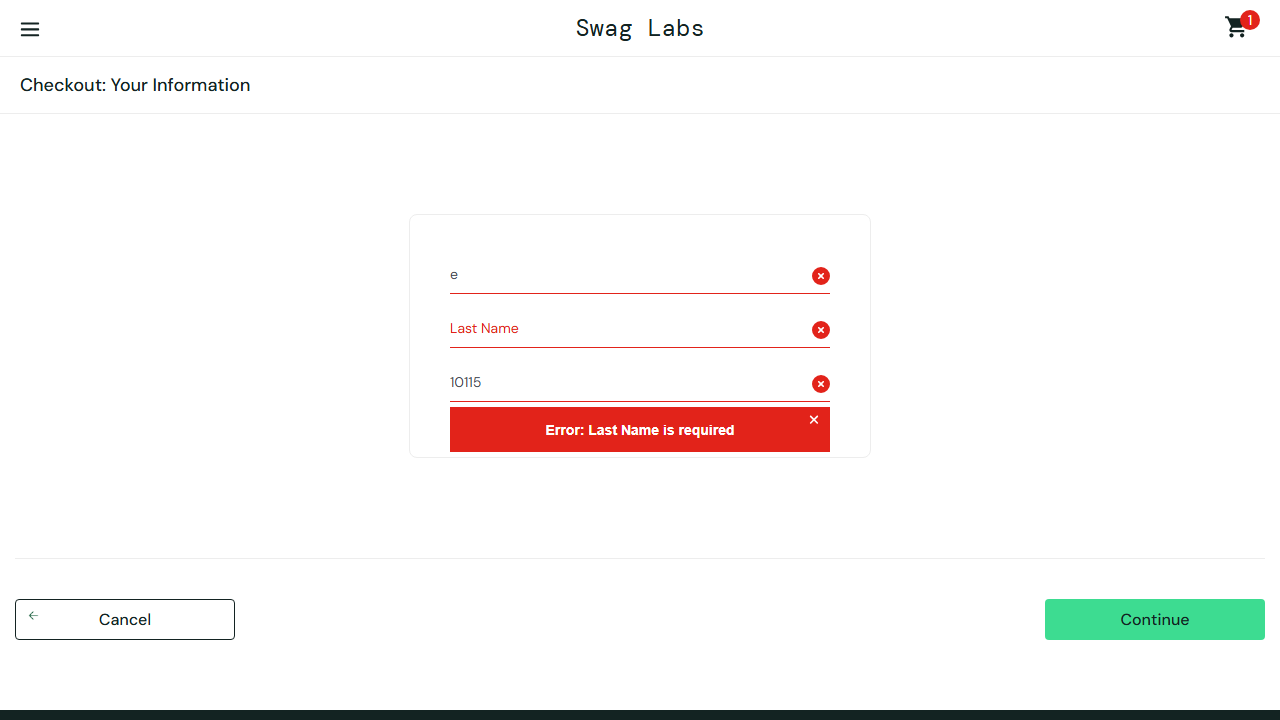
- Typing "Ada" in First Name, then "Lovelace" in Last Name: each character typed into Last Name replaced the First Name value. First Name ended up as "e", the last letter typed, and Last Name stayed empty.
- Pasting the same values: First Name ended up as "Lovelace", and Last Name stayed empty.
We repeated each method three times with the same result. The same steps with standard_user worked. That's what the screen looked like after typing:
Those two extra minutes of testing matter. "Typed and pasted input behave differently" and "only this account is affected" are exactly the clues that send a developer to the right event handler instead of the whole form.
The one-line report: 20 points
This is how bugs often get reported in a chat message or a hurried ticket:
Checkout broken for problem user

Can't enter my name at checkout, it keeps giving an error. Please fix asap, this is really annoying.
The grader failed seven of its checks and gave one partial score:
- No steps to reproduce. Which page? Which field? What was typed?
- No expected or actual result. "Keeps giving an error" doesn't say which error, or what should have happened.
- No environment. Which site, browser, and account?
- No evidence. No screenshot, no exact error text.
- No impact. It doesn't say who is affected or whether there's a workaround.
- No severity or priority. The team can't tell whether to stop what they're doing.
- Too short to act on. 23 words.
- Tone, partial. "Please fix asap, this is really annoying" adds pressure, not information.
The developer's first reply would be a list of questions, and the bug would wait a day for the answers.
Anatomy of a strong report
Each part below shows the exact line from the complete report and the question it answers.
Title: what broke, where, for whom
Checkout: Last Name input writes into First Name for problem_user
A title is read in lists, search results, and notifications. Put the area first ("Checkout"), then the behavior, then the scope. Avoid "broken", "doesn't work", and "issue": they describe your frustration, not the bug.
Environment: where it happened
Environment: https://www.saucedemo.com, account problem_user, Chromium 153 (Playwright 1.63.0), Windows 11. Observed 2026-09-15.
Include the URL or build, the account or role, the browser and version, the operating system, and the date. For a mobile app, add the app version and device model. The date matters more than it looks: it lets someone match the report to a deploy.
Steps to reproduce: a path anyone can follow
- Open https://www.saucedemo.com and log in as problem_user.
- Click "Add to cart" on Sauce Labs Backpack.
- Open the cart and click "Checkout".
- Type "Ada" in First Name.
- Type "Lovelace" in Last Name.
- Type "10115" in Zip/Postal Code and click "Continue".
Three rules make steps reproducible:
- Start from a known state, such as logging in, not from "on the checkout page".
- One action per step, using the exact label on the screen in quotes.
- Give the exact values you entered. "Enter a name" hides the fact that the bug depends on typing a second value.
Expected and actual: the gap is the bug
Expected result: First Name shows "Ada", Last Name shows "Lovelace", and Continue opens "Checkout: Overview".
Actual result: Each character typed in Last Name replaces the First Name value, so First Name shows "e" and Last Name stays empty. Continue shows "Error: Last Name is required" and checkout cannot continue. Pasting the whole value gives First Name "Lovelace" instead.
Write both, even when the expected result feels obvious. Quote error messages exactly, character for character, so they can be searched in the code and logs.
Reproducibility: how often, and what's not affected
Reproducible: 6 of 6 attempts (3 typed, 3 pasted). standard_user is not affected.
"Always" and "sometimes" are opinions; "6 of 6" is data. Saying what is not affected narrows the search as much as saying what is.
Impact: why it matters
Impact: Any customer on this account cannot complete checkout, so every order is blocked. There is no workaround in the UI.
Impact is what turns a bug into a decision. Say who is affected, what they can't do, and whether there's a workaround.
Severity and priority: how bad, how soon
Severity: Major Priority: P2
Severity is how bad the effect is; priority is how soon it should be fixed. They're separate decisions, and the product owner may change the priority. We chose Major rather than Blocker because only one account is affected, and P2 because it's a practice shop. The same bug on every account of a real store would be a Blocker and P1.
Evidence: proof, not a description
Evidence: screenshot problem-user-last-name.png and Playwright trace trace.zip attached.
A screenshot shows the state; a trace or screen recording shows how you got there. For API bugs, attach the request and response, or a curl command that reproduces it. Crop or mask anything sensitive first: tokens, emails, and customer data don't belong in a ticket.
The complete report
This is the full report that scored 100. Copy the structure for your own:
Checkout: Last Name input writes into First Name for problem_user

Environment: https://www.saucedemo.com, account problem_user, Chromium 153 (Playwright 1.63.0), Windows 11. Observed 2026-09-15.
Severity: Major
Priority: P2

Steps to reproduce:
1. Open https://www.saucedemo.com and log in as problem_user.
2. Click "Add to cart" on Sauce Labs Backpack.
3. Open the cart and click "Checkout".
4. Type "Ada" in First Name.
5. Type "Lovelace" in Last Name.
6. Type "10115" in Zip/Postal Code and click "Continue".

Expected result: First Name shows "Ada", Last Name shows "Lovelace", and Continue opens "Checkout: Overview".

Actual result: Each character typed in Last Name replaces the First Name value, so First Name shows "e" and Last Name stays empty. Continue shows "Error: Last Name is required" and checkout cannot continue. Pasting the whole value gives First Name "Lovelace" instead.

Reproducible: 6 of 6 attempts (3 typed, 3 pasted). standard_user is not affected.

Impact: Any customer on this account cannot complete checkout, so every order is blocked. There is no workaround in the UI.

Evidence: screenshot problem-user-last-name.png and Playwright trace trace.zip attached.
Paste your own report into the bug report grader before filing. It runs in your browser, sets severity and priority fields for you, and exports Markdown or Jira markup.
Tone: describe the software, not the people
The one-line report ends with "Please fix asap, this is really annoying." Urgency belongs in the priority field, and frustration doesn't help anyone find the bug. Compare:
- "Developers broke checkout again."
- "Checkout: Last Name input writes into First Name for problem_user."
The second is shorter, searchable, and can't start an argument.
Writing this article caught two mistakes in our own grader. When we first scored the one-line report, it got 30 points: the tone check passed "asap, really annoying", and the impact check passed because the title mentions a "user". We fixed both. Pressure words now earn a partial tone score, and naming a user in the title no longer counts as describing impact. The report now scores 20, and both cases are unit tests so they can't come back. Treat any automated check, including ours, as a minimum, not a guarantee.
One bug per report
When you find several problems in one session, file them separately. On the same problem_user account, every product shows the same placeholder image, a different bug from the checkout form. One report per bug means each can be assigned, fixed, and closed on its own, and none gets lost when the other is marked done.
Checklist before you file
- The title names the area, the behavior, and the scope.
- The steps start from a known state and use exact labels and values.
- Expected and actual results are both written, with error text quoted exactly.
- You reproduced it at least twice and wrote down how often it happens.
- You checked one variation (another account, browser, or input method) and wrote down the result.
- Impact, severity, and priority are set.
- A screenshot, trace, log, or request is attached, with sensitive data removed.
- You searched for an existing report of the same bug.
Conclusion
The difference between our two reports wasn't writing talent. It was ten minutes of work before writing: reproducing the bug, trying one variation, and copying the exact error. A report built from those facts answers the developer's questions in advance, which is the fastest way to get a bug fixed.